New Version is Live!

The new version of SoapmakingFriend.com is live! Please let us know if you spot any issues. We have some design tweaks for mobile coming in the next few days and are aware of those.

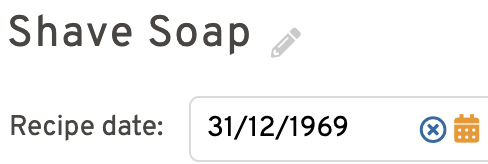
Mine did that too initially- can you go into “my profile” under your name on the right and click “my preferences” and choose your date format and maybe that will straighten it out for you? It did for me, but I don’t think mine was 1969. I’ll tag the developer if that doesn’t work for you.
I did change my preferences back to month/day/year, but it is still replacing the date with 1969 for any recipe that I select and then click Edit
 

Attachments

  • 1648493620467.png
    1648493620467.png
    47.7 KB · Views: 0
The new version of SoapmakingFriend.com is live! Please let us know if you spot any issues. We have some design tweaks for mobile coming in the next few days and are aware of those.
I noticed that my photos were not showing up with my recipes on my recipe page like they were.
And the "Copy" feature for a recipe is not there. This is such a helpful feature!!!!

I just paid for a subscription thinking these options would return and they did not.
What's up with these?
 
I noticed that my photos were not showing up with my recipes on my recipe page like they were.
And the "Copy" feature for a recipe is not there. This is such a helpful feature!!!!

I just paid for a subscription thinking these options would return and they did not.
What's up with these?

I see photos, but someone else mentioned that they did not. They show up when you open the recipe from the list. Or do you mean in the recipe builder area? If you can show me where you mean (a screenshot would be great!) I can dig into this.

"Copy" and "Save as" are coming!
 
I did change my preferences back to month/day/year, but it is still replacing the date with 1969 for any recipe that I select and then click

I see photos, but someone else mentioned that they did not. They show up when you open the recipe from the list. Or do you mean in the recipe builder area? If you can show me where you mean (a screenshot would be great!) I can dig into this.

"Copy" and "Save as" are coming!
THANKS for quick response! You guys are ROCKING the support on this!!
Yay for Copy - I saw save as in the edit screen already.

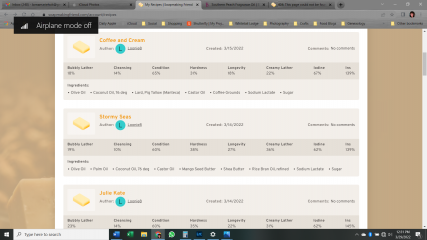
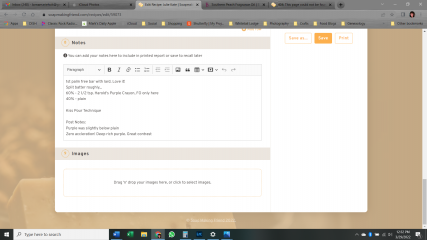
PICTURES: Can't seen them anywhere, and any screen. Here is a screenshot of My Recipe page. And a shot of the Edit page of one recipe where you can add a pic. I had recently added photos for almost every recipe except maybe the last two.

DATE: When I click on a recipe, it as the correct format and date. When I click on Edit for that recipe, it's the 1969 thing others have mentioned.
 

Attachments

  • Screenshot (18).png
    Screenshot (18).png
    459.9 KB · Views: 4
  • Screenshot (19).png
    Screenshot (19).png
    466.3 KB · Views: 4
THANKS for quick response! You guys are ROCKING the support on this!!
Yay for Copy - I saw save as in the edit screen already.

PICTURES: Can't seen them anywhere, and any screen. Here is a screenshot of My Recipe page. And a shot of the Edit page of one recipe where you can add a pic. I had recently added photos for almost every recipe except maybe the last two.

DATE: When I click on a recipe, it as the correct format and date. When I click on Edit for that recipe, it's the 1969 thing others have mentioned.

Thank you so much! I gave that info over to the developer and he's working on things. I'll keep you posted as to a fix.
 
So I can't get the recipe to save with a 1.75:1 water:lye ratio. If I try manually entering the numbers, it rounds down to 1.7, and if I use the arrows to get the exact value, it saves as 1.8.
 
So I can't get the recipe to save with a 1.75:1 water:lye ratio. If I try manually entering the numbers, it rounds down to 1.7, and if I use the arrows to get the exact value, it saves as 1.8.

Currently it saves only to one decimal level with that ratio. You need to have it go to two decimals for the water:lye ratio?
 
Currently it saves only to one decimal level with that ratio. You need to have it go to two decimals for the water:lye ratio?
That was the ratio for my last batch and I'd like to keep it consistent because I'm scaling up for a larger mold. Since the last version allowed for two decimal places it'd be nice to keep that feature!
 
That was the ratio for my last batch and I'd like to keep it consistent because I'm scaling up for a larger mold. Since the last version allowed for two decimal places it'd be nice to keep that feature!

This has been added- thank you so much for the suggestion. Please let me know if you find anything else that you’d like to see in the software.
 
Is the "premium" membership for the calculator linked to the supporter membership on the forum? I have paid to be a supporting member and it's prompting me to pay for the calc now. Just my opinion here, but I think that's sort of a big ask and would prefer to pay for one membership.
 
Free Account
Save all your soap recipes.
Unlock powerful tools and join thousands of soapmakers.
  • Save & organize recipes
  • Recalculate batches instantly
  • Join the community
Create free account
Top